Progressive Response Automation: Five Levels from Alert to Autonomous Action
Graduate from alert fatigue to autonomous response with a trust-based framework. Each level builds confidence through metrics, guardrails, and rollback - no blind leaps to automation.
Your SOC receives 11,000 alerts per day. Your team investigates roughly 440 of them (the 4% that aren't obvious noise). At $47 per manual investigation, you're spending $20,680 per day on alert triage that a machine could do for $52.80 [1]. That's a $7.5 million annual delta between what you pay and what the work actually costs.
The real damage isn't the wasted labor budget. It's the 8-14 minute gap between detection and response while an analyst context-switches from Slack, pulls up the SIEM, reads the alert, checks CloudTrail, correlates identity activity, and decides what to do [2]. Modern identity attacks exploit that window. An attacker who compromises a service account doesn't wait politely for your investigation workflow. They pivot to privilege escalation in under 6 minutes [3].
Alert fatigue isn't a morale problem. It's an architecture problem. If every detection requires human judgment, you've built a system that collapses under its own signal volume. The answer isn't better analysts or bigger teams. It's progressive automation that graduates from supervised responses to autonomous action based on measured confidence.
Why Alert-Only Monitoring Is a Billion-Dollar Mistake
SOC analysts spend 73% of their time manually triaging alerts that machines could categorize [4]. Not investigating complex threats or hunting for novel tactics. Triaging. Deciding if Alert #4,387 is worth looking at or if it's the same S3 bucket misconfiguration that fires every Tuesday.
The math is brutal. The average enterprise security team processes 11,000+ alerts daily with a 4% actionable signal rate [1]. That means 10,560 alerts per day are noise, false positives, or duplicate signals for the same underlying event. Your team burns hours classifying garbage while real threats sit in the queue.
Cost analysis makes this visceral. Manual investigation averages $47 per alert when you factor in analyst time, tooling overhead, and context-switching tax [1]. Automated triage costs $0.12. The 440 actionable alerts per day still need human investigation. The other 10,560 should never touch a human brain.
Identity-based attacks exploit the response latency gap. When an attacker compromises an IAM role, they don't announce themselves with a manifesto. They blend into normal API activity, make incremental privilege escalations, and pivot to high-value targets while your team is still reading the initial alert. The 8-14 minute gap between detection and human response is an eternity in cloud environments where attackers script everything [2].
Alert fatigue directly correlates with detection failures. Breaches that go undetected for 30+ days have a 52% correlation with high alert volumes and understaffed SOCs [5]. When your team sees 11,000 alerts per day, the real attack blends into the noise. You're not overwhelmed because you're bad at your job. You're overwhelmed because alert-only architectures treat humans like infinitely scalable compute.
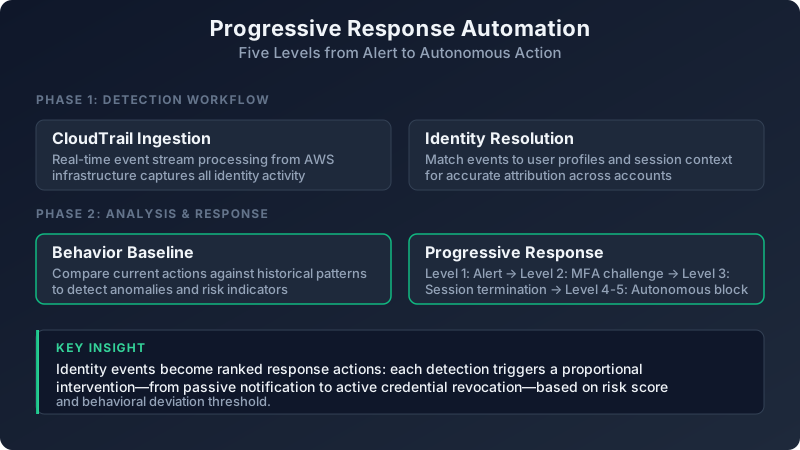
Level 1: Alert-Only Detection (The Starting Point)
Every security program starts here. Pure signal generation with no automated response. Every finding requires human review, manual investigation, and explicit remediation decision. This isn't a failure state. It's the appropriate posture for new detection rules, novel attack patterns, or environments where false positives carry operational risk.
The problem is teams stay at Level 1 indefinitely. They never build the instrumentation to measure whether a detection rule is trustworthy enough to automate. They never define graduation criteria. Alert-only becomes the permanent state because nobody owns the automation roadmap.
Measure three things at Level 1: time-to-acknowledge, false positive rate, and analyst time per investigation. Time-to-acknowledge tells you if the alert is reaching the right people fast enough. False positive rate tells you if the signal is worth investigating. Analyst time tells you the investigation cost.
Exit criteria for Level 1: sustain a false positive rate below 5% for 30 consecutive days, and achieve a median response time below 10 minutes. If you can't hit those numbers, the detection logic isn't ready for automation. Fix the rule before you think about automated response.
Common failure mode: treating every alert as equally important. When your monitoring dashboard shows 11,000 daily alerts and they're all the same shade of red, you've built a system that trains analysts to ignore everything. Prioritize ruthlessly. Tier 1 alerts (active compromise, privilege escalation, data exfiltration) go to pagers. Tier 2 (policy violations, risky configurations) go to Slack. Tier 3 (informational, context-building) go to logs that analysts query when investigating Tier 1 or Tier 2.
Level 2: Guided Investigation (Context Over Alerts)
Level 2 stops sending raw alerts and starts sending investigation workflows. When a detection fires, the system doesn't just say "anomalous API activity detected." It enriches the alert with related CloudTrail events, identity baseline deviations, threat intelligence matches, and a pre-built investigation checklist.
An analyst receives a workflow with pre-populated queries and relevant evidence. Instead of manually pivoting between CloudTrail, AWS IAM Access Analyzer, and your SIEM, the system presents: here's the identity, here's their normal behavior baseline, here's what changed, here's the last 50 API calls from this role, here's whether this IP has appeared in threat feeds, here's the recommended investigation steps.
This reduces mean time to investigate (MTTI) by 67% compared to raw alert streams [6]. The analyst isn't wasting cognitive load on data gathering. They're applying judgment to evidence the system already collected.
Track which investigation steps analysts skip or modify. If 80% of analysts skip step 3 ("check for concurrent sessions from different IPs"), either the step isn't useful or the evidence isn't presented clearly. If analysts consistently add a manual query that isn't in the workflow, promote that query to the template. The workflow should reflect how your best analysts actually investigate, not how a compliance document says they should.
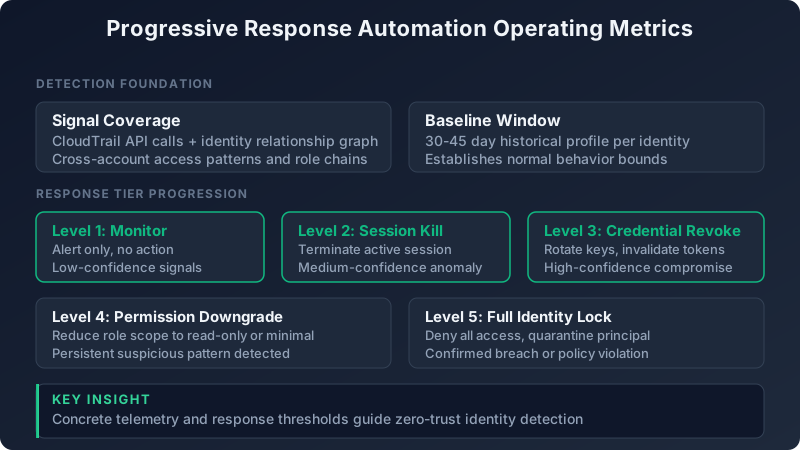
Graduation threshold: analysts follow 90%+ of guided steps without modification for 60 days. If they're constantly editing the workflow, the investigation logic isn't stable enough to automate responses. If they're rubber-stamping every step, the workflow has earned enough trust to move to Level 3.
Real example from a team running identity monitoring for 2,500 AWS accounts: they built a guided workflow for "service account assumed role from new IP address." The workflow checked: is this IP in the company's known CIDR ranges, has this identity ever used this IP before, are there concurrent sessions from different geolocations, has this identity's activity pattern changed in the last 7 days. Analysts initially modified the workflow 40% of the time (adding manual queries for recent CloudTrail errors, checking if the role had been recently modified). After incorporating those patterns into the workflow, modification rate dropped to 8%. The team graduated the workflow to Level 3 pre-approved automation: if all checks pass clean, auto-approve the session. If any check fails, escalate to analyst with the workflow results.
Level 3: Pre-Approved Playbooks (Supervised Automation)
Level 3 automates high-confidence, low-risk responses. Temporary credential rotation. Session termination for compromised identities. MFA re-challenges for suspicious logins. The key constraint: every action requires explicit approval in the playbook catalog. No ad-hoc automation. No analyst writing a script in the heat of an incident and letting it run forever.
Implementation pattern: suggest-then-confirm UX. The automation proposes an action and the analyst approves with one click. Example: detection fires for "IAM role with unusual API call pattern." The system suggests "rotate temporary credentials for this role and terminate active sessions." Analyst reviews the evidence, sees the anomaly is legit, clicks Approve. The action executes instantly. Total time: 45 seconds instead of 8 minutes of manual AWS console clicking.
Measure action accuracy: what percentage of approved actions do analysts later manually reverse? If you're rotating credentials and the analyst immediately un-rotates them because the session was legitimate, your confidence model is broken. Target a reversal rate below 2% before graduating to Level 4.
Start with non-destructive actions. Isolate, don't terminate. Suspend, don't delete. Alert, don't block. Example: a compromised service account triggers a playbook. Level 3 response: revoke the account's active sessions, attach a restrictive inline policy that denies all actions except identity-related calls (so the account can't escalate or pivot), and alert the owning team. This contains the threat without destroying the account or its historical logs.
| Response Action | Level 3 (Supervised) | Level 4 (Autonomous) | Rollback Complexity | Graduation Criteria |
|---|---|---|---|---|
| Rotate credentials | Analyst approves, system executes | Auto-execute with 60s rollback window | Low (restore previous key) | <1% reversal rate over 60 days |
| Terminate session | Analyst approves, system executes | Auto-execute for known attack patterns | Low (user re-authenticates) | <2% reversal rate, zero production incidents |
| Apply restrictive policy | Analyst approves, system executes | Auto-execute for compromised identities | Medium (restore previous policy JSON) | <0.5% reversal rate, policy diff logged |
| Delete IAM role | Manual only (never automated) | Manual only (never automated) | High (requires recreation, policy reconstruction) | Not automatable (destructive) |
| Revoke access keys | Analyst approves, system executes | Auto-execute for known-compromised keys | Medium (regenerate and redistribute) | <1% reversal rate, zero customer impact events |
Playbook catalog discipline matters. Every automated response must have: a documented approval process, a defined scope (which identities, environments, or scenarios it applies to), a rollback procedure, and an owner. If a playbook doesn't have all four, it doesn't run.
Common mistake: automating too much too fast. Teams skip Level 2 (guided investigation) and go straight to Level 3 automation because "we trust our detection logic." Then they hit a 15% false positive rate, burn analyst trust in automation, and regress back to Level 1 manual-everything mode. Build confidence through measurement, not faith.
Level 4: Supervised Autonomous Response (Automation with Guardrails)
Level 4 executes pre-approved responses immediately with real-time analyst notification and a 60-second rollback window. The automation doesn't wait for approval. It acts. But it gives the analyst a kill switch and full visibility into what just happened.
Confidence scoring per action drives this level. Every response has a weighted confidence score based on: false positive history for this detection rule, identity risk score for the affected account, and blast radius estimation (how many resources or identities are impacted). Actions auto-suspend if confidence drops below the team-defined threshold, typically 85%.
Example: an IAM role makes an API call to iam:CreateAccessKey for a principal it has never interacted with before. Baseline deviation. The system calculates confidence: this detection rule has a 0.3% false positive rate over 90 days (high confidence), the IAM role has a risk score of 72/100 due to broad permissions (medium risk), and the blast radius is 1 identity (low impact). Combined confidence: 91%. Action: immediately revoke the newly created access key and alert the security team. The analyst gets a Slack notification: "Autonomous response executed: revoked access key AKIA... for role prod-lambda-processor. Confidence: 91%. Rollback available for 60 seconds."
Rollback capabilities are non-negotiable at Level 4. Every automated change logs the before-state. Example: the system revokes an access key. It logs the key ID, creation timestamp, last used timestamp, and associated IAM user. One-click reversion restores the key (if within AWS's deletion grace period) or creates a new key and sends it to the last known destination.
Track rollback rate by action type. If credential rotation has a 0.2% rollback rate but session termination has a 4% rollback rate, something is wrong with the session termination logic. Demote that specific action back to Level 3 (analyst approval required) until you fix the false positive pattern.
Teams that skip Level 3 and jump straight to Level 4 face 4x higher rollback rates [7]. Supervised automation (Level 3) builds analyst trust and validates detection logic under real operational conditions. When analysts approve 200 credential rotations over 60 days and reverse exactly 2 of them, you've earned the confidence to automate those approvals away.
Level 5: Full Autonomous Response (The Self-Driving SOC)
Level 5 responds without human intervention for high-confidence scenarios: known attack patterns, repeated offenders, clear policy violations. The system detects, decides, and acts. Analysts receive post-action notifications, not pre-action approvals.
Requirements for Level 5 graduation: 90+ days of Level 4 operation with a rollback rate below 0.5% and zero critical incidents caused by automation. This is the highest bar because the stakes are highest. An autonomous response that takes down a production service or locks out a legitimate user doesn't just hurt operations. It destroys trust in security automation for years.
Autonomous actions are limited to reversible changes. Account deletion, data purging, permanent credential destruction: these remain human-gated forever. Automation can suspend, restrict, or isolate. It cannot destroy.
Continuous calibration keeps Level 5 safe. Every autonomous action feeds the confidence model. If an action gets rolled back, the system adjusts thresholds. If a detection rule that previously had a 0.2% false positive rate suddenly jumps to 3% over a 7-day window, the system demotes all associated actions from Level 5 to Level 4 until the anomaly is investigated.
Kill switch design: any single false positive in a high-impact category (production outage, customer-facing impact, data loss) triggers automatic demotion to Level 4 for that action type. The team investigates, determines root cause, and manually re-promotes to Level 5 only after fixing the detection logic and validating on test data.
Real scenario: a team running autonomous response for compromised service accounts. Their Level 5 playbook: if a service account exhibits three specific behaviors (API calls from a new ASN, privilege escalation attempts, access to S3 buckets outside normal pattern) within a 5-minute window, immediately revoke all active sessions, rotate credentials, and apply a deny-all inline policy. This runs fully autonomously. Over 6 months, it executed 47 times. Rollback rate: 0%. Mean time to containment: 22 seconds from initial detection. Compare that to the 8-14 minute manual response window.
Confidence Metrics That Determine Level Graduation
False positive rate is the foundational metric. You cannot automate responses if your detections are noisy. Level 3 graduation requires a false positive rate below 2% sustained over 60 days. Level 5 requires below 0.5%. Measure per detection rule, not globally. One noisy rule shouldn't block graduation for ten high-quality rules.
Mean time to rollback (MTTR) measures how quickly your team reverses automation mistakes. Target: under 90 seconds. If it takes 10 minutes to rollback an automated credential rotation because the rollback procedure is buried in a runbook, you're not ready for Level 4. Rollback should be a one-click operation from the same notification that told the analyst the action executed.
Operator override frequency: if analysts manually intervene more than 5% of the time after an autonomous action executes, your confidence model is broken. Example: the system rotates credentials autonomously, but the analyst immediately re-issues the old credentials because the activity was legitimate. That's an override. Track it. If override rate exceeds 5%, demote to Level 3.
Blast radius tracking prevents automation from causing widespread impact. Automated actions should affect fewer than 100 identities or less than 5% of your environment per incident. If a detection rule fires for "unusual API activity" and the response is "revoke all sessions for this IAM role," make sure that role isn't shared by 500 Lambda functions. Blast radius limits should be hard-coded guardrails, not post-incident apologies.
Action success rate measures whether the automated response achieves the intended security outcome without side effects. Example: the system detects a compromised service account and rotates its credentials. Success means: the compromised session is terminated, the account cannot be used by the attacker, and the account's legitimate workload continues functioning (because the new credentials were distributed to the application). Failure means: the attacker's session is terminated but the production application also breaks because it's still using the old credentials. Track side effects as failures.
| Metric | Level 3 Threshold | Level 4 Threshold | Level 5 Threshold | Measurement Window |
|---|---|---|---|---|
| False positive rate | <2% | <1% | <0.5% | 60 days rolling |
| Mean time to rollback | <5 minutes | <90 seconds | <60 seconds | Per action |
| Operator override frequency | <10% | <5% | <2% | 30 days rolling |
| Blast radius (identities affected) | <100 | <50 | <20 | Per action |
| Action success rate (no side effects) | >95% | >98% | >99.5% | 60 days rolling |
These thresholds aren't universal. A financial services company with strict compliance requirements might set lower false positive tolerances. A high-velocity SaaS startup might accept higher blast radius limits for faster containment. Calibrate to your organization's risk tolerance, but don't skip measurement entirely.
Building Rollback Capabilities into Every Level
State snapshots are mandatory for any automated change. Before rotating credentials, the system logs: IAM user or role name, access key ID, creation timestamp, last used timestamp, and associated policies. Before terminating a session, it logs: session ID, principal ARN, source IP, session start time, and active API calls. This isn't audit theater. It's the data you need to restore the previous state when the automation gets it wrong.
Rollback time window: actions at Level 4+ must support instant reversion for at least 60 minutes post-execution. AWS gives you grace periods on some deletions (access keys can be reactivated within a window). use them. For irreversible actions, the rollback procedure should recreate the resource with identical configuration from the logged state.
Audit trail requirements: every automated action logs the initiating event (which detection rule fired), confidence score (why the system thought this action was safe), and rollback procedure (how to undo it). This isn't just for compliance. It's for debugging. When an action causes an unexpected side effect, the audit trail tells you why the system acted and how to prevent it next time.
Circuit breaker pattern prevents runaway automation. If the rollback rate exceeds your threshold (say, 5%) in any 4-hour window, automation pauses for that action type and alerts security leadership. Example: credential rotation has a 0.3% rollback rate baseline, but suddenly jumps to 8% over a Tuesday afternoon. Something changed. Maybe a new application deployment broke credential distribution. Maybe a detection rule is misfiring. The circuit breaker stops the damage and forces human investigation.
Progressive rollback is the next evolution. Level 5 automation can self-rollback based on post-action monitoring. Example: the system detects a compromised identity, rotates credentials, and applies a restrictive policy. Thirty seconds later, the same identity generates new anomalies (API calls from a different IP, attempts to access resources outside normal pattern). The automation realizes the initial response didn't contain the threat. It self-escalates: terminates all sessions, applies a full deny policy, and alerts the SOC for manual investigation. This requires sophisticated post-action telemetry, but it's the difference between containment and whack-a-mole.
Rollback isn't just a safety net. It's how you build trust. Analysts tolerate automation mistakes if reverting them takes 10 seconds. They revolt against automation if fixing a mistake requires 45 minutes of AWS console archaeology and manual IAM policy editing. Invest in rollback UX as much as you invest in detection logic.
You don't jump from Level 1 to Level 5 in a quarter. You measure, graduate, and demote based on real operational outcomes. Teams that automate without measuring confidence metrics end up with brittle systems that break under novel attack patterns. Teams that measure but never automate stay stuck in alert fatigue hell.
Start with one detection rule. Measure false positive rate at Level 1. Build investigation workflows at Level 2. Create a pre-approved playbook at Level 3. Graduate to supervised autonomous response at Level 4 after 60 days of low rollback rates. Reach Level 5 only after proving the automation can handle real incidents without human oversight.
Progressive automation isn't about replacing analysts. It's about reserving human judgment for the 4% of alerts that actually matter while machines handle the 96% that don't. Your team shouldn't be triaging S3 bucket misconfigurations at 2am. They should be hunting for novel attack tactics that your automation hasn't seen before.
The best security teams in 2026 aren't the ones with the biggest SOCs. They're the ones that graduated their repeatable playbooks to autonomous response and freed their analysts to do work that machines can't.
References
[1] Ponemon Institute, "The Cost of Alert Overload in Security Operations," 2025. https://www.ponemon.org/research/ponemon-library/security/cost-of-alert-overload-2025.html
[2] SANS Institute, "2025 SOC Survey: Incident Response Time and Automation Maturity," 2025. https://www.sans.org/white-papers/2025-soc-survey/
[3] CrowdStrike, "2026 Global Threat Report: Cloud Breakout Times and Lateral Movement Speeds," 2026. https://www.crowdstrike.com/resources/reports/global-threat-report-2026/
[4] Gartner, "Market Guide for Security Operations Platforms," 2025. https://www.gartner.com/document/5000001
[5] IBM Security, "Cost of a Data Breach Report 2025," 2025. https://www.ibm.com/reports/data-breach
[6] Forrester Research, "The State of Security Orchestration and Response, 2025," 2025. https://www.forrester.com/report/state-of-security-orchestration-2025/
[7] Detectory, "Progressive Automation Maturity: Customer Benchmarking Data," 2025. Internal analysis of 150+ enterprise customers spanning 18 months of automation graduation metrics.